
PAY FEE DIGITALLY
Instructions for Online Payment (DOWNLOAD PDF)
Dear Depositors,
To Generate An Online Challan, Please Follow These Steps:
- Click here to obtain the online challan.
- Enter your registration number and click “Search.”
- Your challan details will be displayed. You can only print pending or unpaid challans.
- Click the Print button to open your challan in a new tab. (If it doesn’t open, disable the popup blocker in your browser). Print the challan and proceed with your banking app. Be sure to note or copy your KuickPay Customer Number or 1-BILL Consumer Number.
- After payment, click here to verify the status of your paid challan.
Important:
If the pending/unpaid challan does not open when clicking the Print button in a new tab, disable the popup blocker in your browser. Follow these steps:
For Google Chrome
|
On PC (Windows/Mac):
|
On Android:
|
For Mozilla Firefox
|
On PC (Windows/Mac):
|
On Android:
|
PAYMENT OPTIONS
-
- Kuickpay (Prefix ID: 71090)
- 1-Bill Invoice (Prefix ID: 1001145146)
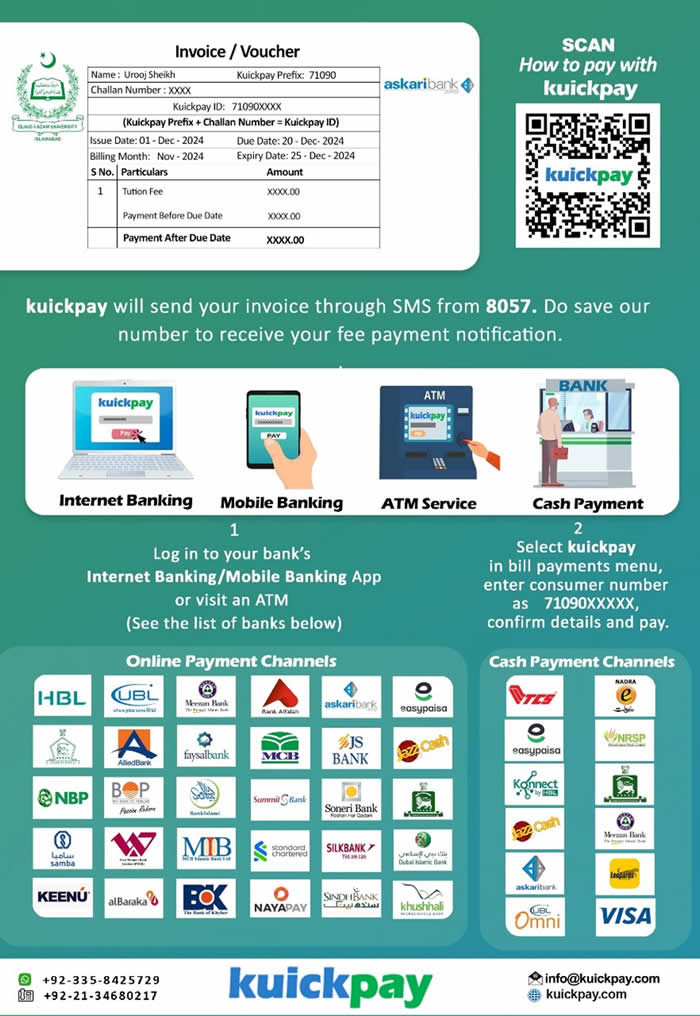
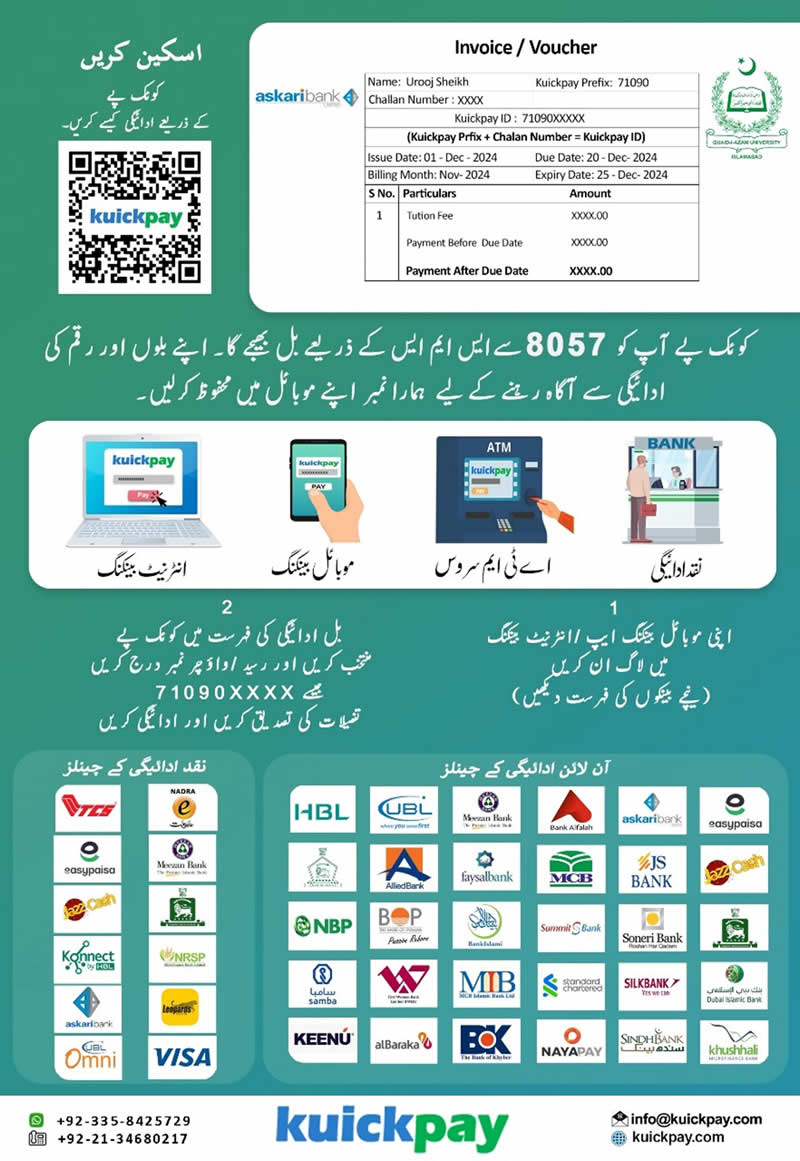
Kuickpay (Prefix 71090)
-
- Kuickpay Prefix: 71090 (this is a static value)
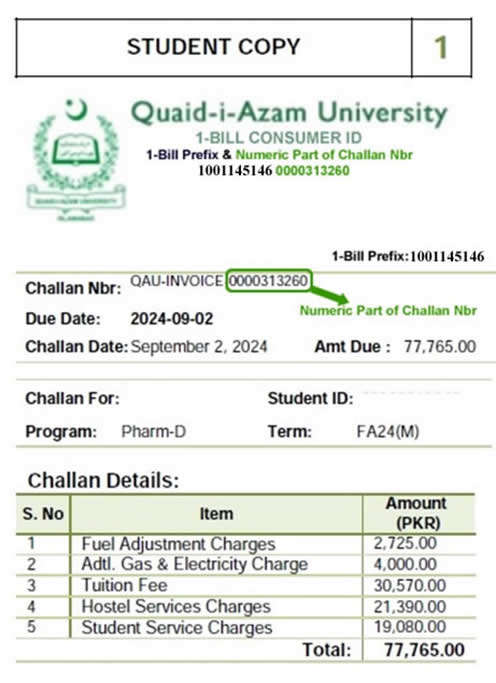
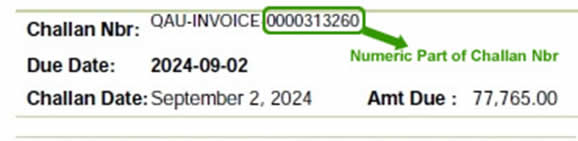
- Numeric part of your challan number.
For example, if the challan number on your printed invoice is QAU-INVOICE-0000313260, you will only enter the numeric part (0000313260). This numeric part is unique to each challan. - Your Kuickpay Consumer Number will be the combination of the Kuickpay prefix and the numeric part of the challan number.
- Kuickpay Prefix(static value): 71090
- Numeric Part of Challan Number: 0000313260
- Kuickpay Customer Number: 710900000313260
- Enter this Kuickpay Customer Number in the required field.
- Fee details will appear, and you can proceed to pay the amount.
For detailed instructions on how to make payments via Bill Payment (Internet/Mobile Banking, ATM, or Over-the-Counter cash deposit), please Click Here:
 Select Quaid-e-Azam University.
- The Company/Institution ID field will automatically display the QAU KuickPay Prefix: 71090.
- A list of Digital Partner Banks (for Bill Payment via Internet/Mobile Banking and ATM) and Over the Counter (OTC) Partners (for Cash Payments) will be populated. Select your preferred partner to view the specific payment process.
To pay via credit/debit card, visit the Kuickpay Portal for card payments.
Video Tutorials: How to Pay Using KuickPay in Different Banking Apps
Watch step-by-step videos on how to make payments via KuickPay using different banking apps. These videos guide you through the payment process for seamless transactions.
Click here watch YouTube Playlist
BILL INVOICE
Please follow the procedure below to pay fees online via the HBL App or any other bank’s app:
1-Bill Payment Method for Non-HBL (Other Banking Apps) Users
- Open your bank’s app or internet banking and go to the 1-Bill Invoice payment option. Fee can also be paid using 1-Link mode, accessing through any Bank’s Mobile App/Internet Banking/ATM
- Enter the following digits as the 1-Bill Prefix: 1001145146 (this is a static value) before entering the challan number.
- Enter the numeric part of your challan number.
- For example, if the challan number on your printed invoice is QAU-INVOICE-0000313260, you will only enter the numeric part (0000313260). This numeric part is unique to each challan.
- Your 1-Bill Consumer Number will be the combination of the 1-Bill Prefix and the numeric part of the challan number.
- 1-Bill Prefix (static value): 1001145146
- Numeric Part of Challan Number: 0000313260
- 1-Bill Consumer Number: 10011451460000313260
- Enter this 1-Bill Consumer Number in the required field.
- Fee details will appear, and you can proceed to pay the amount.
For HBL
- Go to the More option on the HBL App.
- Next, go to the Education tab on the HBL App.
- Select or search for the institute “Quaid-i-Azam University Islamabad.”
- Enter the numeric part of the challan number (e.g., 0000313260).
Note: For making payment Using Education Option through HBL Internet banking and Mobile App, Students/Parents need to have bank account in HBL. - Pay the fee, and you’re done.
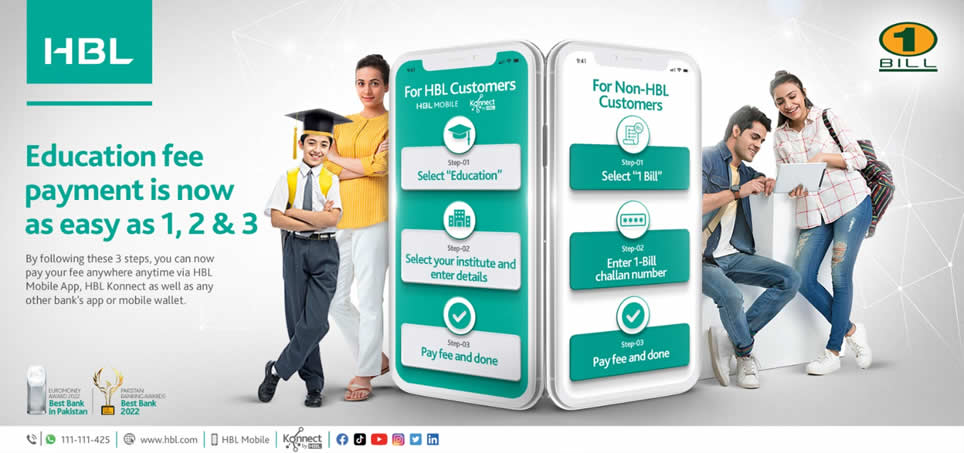
Video Tutorial: How to Pay Online Through HBL APP for HBL and Non-HBL Customers
We have prepared a detailed video guide on how to make online payments using the HBL or other banking APP, catering to both HBL and non-HBL customers. The video walks you through the entire process, from logging into the app to selecting your bill, entering payment details, and confirming the transaction. Whether you’re an HBL account holder or a customer of another bank, this step-by-step tutorial ensures you can easily and securely complete your payments online using the HBL APP.